
A new customer inquiry arrives through your website. You want it recorded, routed to the right person, and answered promptly. Does that require an AI agent? Often, a simple workflow does most of the job. The useful question is how much interpretation and freedom the task actually needs.
This guide gives business owners a practical way to choose between conventional automation, an AI-assisted workflow, and an agent. The examples are illustrative; they are not claims of measured customer results.
Three approaches to business automation
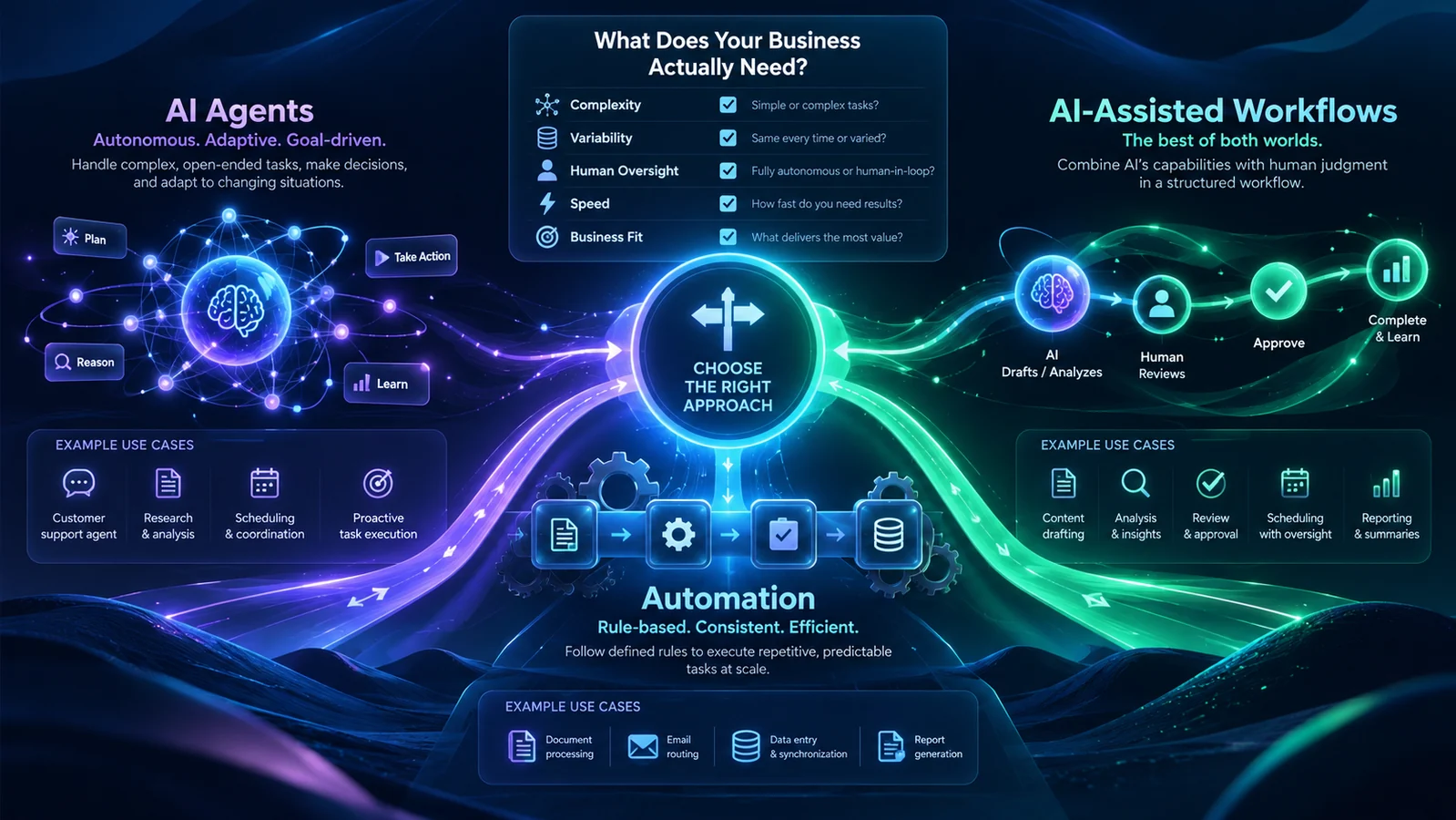
1. Conventional automation: you define the steps
A conventional workflow follows rules that someone has specified. When a form is submitted, validate the fields, create a record, assign an owner, and send a receipt. The system can branch, retry, and handle exceptions, but its available paths are designed in advance.
This is a strong starting point when inputs are structured and the rules are stable. A booking reminder based on an appointment date does not need a language model to decide whether tomorrow comes before next week. It needs correct dates, reliable delivery, and a way to handle failures.
2. An AI-assisted workflow: interpretation inside a defined process
Sometimes one part of a predictable process involves messy language. An inquiry might describe a problem without naming the right service. AI can suggest a category, extract relevant details, or prepare a draft reply while the surrounding software still controls the sequence.
Here, the model helps interpret or generate content. It does not need authority to invent new business actions. For example, it can draft an answer from approved information while a person checks the answer and chooses whether to send it.
3. An AI agent: the model can choose the next step
An agent can select actions and tools as it works toward an objective. It might inspect an approved information source, decide that something is missing, use another permitted tool, and revise its approach based on the result.
Terminology varies between vendors. A useful distinction is who controls the sequence: predetermined application logic or the model during execution. Anthropic describes this distinction in its engineering guide to workflows and agents. Calling a chatbot an agent does not establish what it can access or do.
Our recommendation is to use agent behavior when choosing the next step is a real part of the problem. More freedom creates additional behavior to test and supervise, so it should earn its place in the design.
Why this matters now
Agents are becoming a standards and security concern as well as a product category. In February 2026, NIST announced an AI Agent Standards Initiative focused on secure, interoperable adoption. OWASP also published a 2026 risk framework for agentic applications.
For a business evaluating software, this makes permissions, supervision, and interoperability useful purchasing questions. Ask which tools a system can call, which records it can change, and how an operator can stop it. A compelling demonstration should lead to those questions before a production rollout.
One inquiry, three possible designs
Imagine a service business receiving this message: “Our front desk misses calls during busy periods. We need help with booking, but urgent issues must reach a person.”
- Conventional workflow: the form records the inquiry, sends a receipt, and assigns it to a team member. A required service dropdown determines the route.
- AI-assisted workflow: the system suggests a service category from the message and prepares a summary for the team. Unclear requests remain in a review queue.
- Bounded agent: the system can choose among approved tools to investigate the request and prepare a recommendation. Any tool that changes a booking or sends an external message has separately defined permissions and approval rules.
The third design may be useful when investigation varies substantially between requests. If the business only needs reliable capture and routing, the first or second may be easier to operate. The choice depends on the work and the cost of getting it wrong.
Where each approach tends to fail
The right comparison is not which option looks most advanced. It is which failure mode your team can see, contain, and recover from. Every design trades one kind of flexibility for another kind of operational burden.
Rules can become brittle when the real world changes
Conventional automation is dependable when its inputs and rules stay consistent. It can fail quietly when a supplier changes a file format, a team adds a new service category, or a customer answers a structured question with unexpected text. The remedy is usually clear ownership: log exceptions, alert a person, and review the rules when the business changes. A rules-based system is not maintenance-free, but its behavior is generally easier to reproduce and diagnose.
AI assistance can sound certain when the evidence is weak
An AI-assisted workflow can misclassify an unusual request, omit a material detail from a summary, or draft a confident answer that is not supported by the approved source. That is why the surrounding workflow matters. Show the source beside the draft, label generated content, make correction easy, and send low-confidence or high-impact cases to a person. Our guide to AI data privacy and business control also explains why teams should decide what information may reach a model before connecting business records.
Agents can multiply the impact of a bad decision
An agent combines model output with tools. A mistaken interpretation becomes more serious when the system can email a customer, change a record, place an order, or expose information from another system. The risk also grows across a chain of apparently small steps: read a message, retrieve a file, update a ticket, and notify a third party. Each step needs its own permission boundary and audit trail.
NIST’s work on software and AI agent identity and authorization highlights identification, authorization, auditing, and protection against prompt injection as practical control areas. For a business buyer, those ideas translate into direct questions: does the agent have its own identity, can its access be limited, and can an operator reconstruct what it did?
Questions to ask before you buy or build
A product demonstration usually shows the successful path. Production readiness becomes clearer when you ask the vendor or project team to walk through the boundaries and the recovery path.
- What starts the workflow? Identify the exact trigger: a form submission, an inbound email, a calendar event, a database change, or a person pressing a button. A vague trigger makes duplicate actions and missed work harder to prevent.
- Which information can the system read? List the specific folders, mailboxes, records, fields, and knowledge sources. “Access to the CRM” is too broad if the job only needs a customer name, service type, and open ticket.
- Which actions can it take? Separate reading, drafting, creating, changing, sending, deleting, and purchasing. A system that may prepare an email does not automatically need permission to send it.
- Where does human approval occur? Define approval by consequence. Publishing a social draft, changing a confirmed booking, approving a refund, and updating an internal note do not carry the same risk.
- How are exceptions handled? Ask what happens when required data is missing, two systems disagree, a provider is unavailable, or a tool returns an unexpected result. “Try again” is not a complete recovery plan.
- What evidence is retained? An useful record includes the request, relevant source references, proposed action, approval decision, tool result, and final outcome. Retention should match the business purpose instead of keeping everything indefinitely.
- Can access be revoked quickly? The owner should be able to disable a tool, rotate a credential, stop a workflow, and return the task to a manual process without waiting for a full rebuild.
These questions are useful even when the product is marketed as a copilot, assistant, automation platform, or agent. The label does not tell you which data crosses a boundary or which action can happen without approval. The answers do.
Compare operating cost, not only subscription price
A simple workflow can be inexpensive to run but costly to change if the rules are scattered across several tools. An AI-assisted workflow adds model usage, review time, and quality checks. An agent adds monitoring, permission design, evaluation, incident handling, and more paths to test. Those costs may be justified when the work is variable and valuable, but they should be included in the decision.
Estimate the whole operating loop: staff time before automation, expected volume, percentage of cases requiring review, correction time, provider and integration costs, and the impact of a wrong action. Include who will maintain instructions and source material after launch. A process that depends on an outdated policy document can fail even when the software is working exactly as designed.
For an early pilot, measure a small set of outcomes that people can verify: time to first useful draft, percentage accepted without material correction, number of exceptions escalated correctly, and failed deliveries or tool calls. Avoid using the amount of generated text or the number of automated steps as proof of business value.
A practical decision checklist
Before selecting a platform, answer these questions with the people who own the workflow:
Define authority separately from intelligence
A model’s ability to propose an action is separate from its permission to execute it. A draft reply can be helpful without being sent automatically. A suggested appointment can be useful without allowing the system to alter every calendar entry.
Our security approach treats access, data boundaries, and human authority as explicit design decisions. For a pilot, document permitted tools, allowed data, approval points, stopping conditions, and a fallback to a person. These controls also matter when the system is self-hosted: owning the server does not automatically limit the model’s authority.
Where Waldok products fit
Waldok’s product catalog is organized around defined operational jobs. Two examples show why useful AI does not require unrestricted autonomy:
- ReplyPilot supports drafting customer email and Google Business Profile review replies, with human approval before sending. It illustrates how AI-generated language can fit inside an accountable communications workflow.
- FacePrompt supports creating, reviewing, scheduling, and publishing AI-assisted Facebook content from software installed on the customer’s server. Its value is in supporting that content workflow; the label “agent” is not necessary to explain the job.
Other systems apply bounded agent behavior across several connected tasks. Our guide to an AI chief of staff for executive operations shows how preparation, approval, execution, and verification can work across email, calendars, meetings, commitments, documents, research, and travel. Waldok Receptionist remains listed in the current site catalog, where availability and development status should be considered before any production discussion.
When an existing product does not fit, a custom AI delivery process can start by mapping the actual workflow and deciding which parts need rules, language assistance, or bounded agent behavior.
How to start a useful pilot
Choose one workflow with a named owner and a clear finish line. Record its current turnaround time, error patterns, and staff effort before changing it. Use representative examples that you have permission to process, including incomplete requests and awkward exceptions.
Run the first version in a mode where staff can inspect its output before it changes live records or communicates externally. Track corrections as well as successful outputs. A system that produces drafts quickly but creates substantial review work may need a narrower task or better source information.
Agree on acceptance criteria before expanding access: acceptable error levels, review effort, escalation behavior, and what happens during a provider outage. Keep an operational owner after launch. The workflow will change as the business changes.
Start with the simplest design that can do the job reliably. Add model-driven decisions where they solve a demonstrated problem, and keep consequential authority explicit.
If you are choosing a starting point, tell us about your workflow: what triggers it, which systems it touches, and which decisions must stay with your team.
Ready to put this decision into practice? Our guide to choosing your first AI business workflow includes a scoring method, a cost example, and a practical pilot plan.